

AI Agents for Business
AI agents are not science fiction. They're working inside businesses right now—autonomously handling customer support tickets, analyzing data sets, reconciling invoices, and running complex multi-step processes with minimal human intervention.
An AI agent is fundamentally different from a chatbot. A chatbot responds to questions. An AI agent pursues goals—it plans, gathers information, takes actions, and course-corrects when things don't work as expected.
At Digital Colliers, we're seeing enterprises unlock 30-50% operational efficiency gains by deploying AI agents for business automation. This guide explains what autonomous AI agents actually are, why the hype is justified, which use cases deliver real ROI, and what you need to consider before deployment.
What Is an AI Agent, Really?
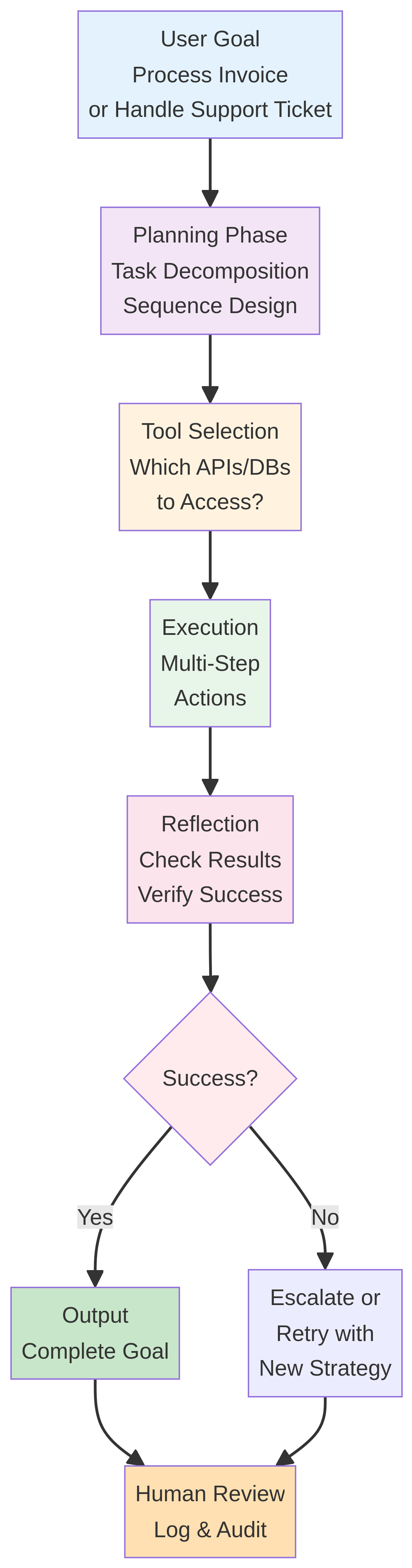
An AI agent is a software system that:
- Understands goals – you tell it what you want accomplished
- Plans autonomously – it breaks down the goal into steps
- Uses tools – it accesses APIs, databases, web searches, documents
- Takes actions – it executes steps without asking permission for each one
- Reflects and adapts – it monitors results and adjusts if something fails
Here's the loop:
Key difference from RPA (Robotic Process Automation):
- RPA records and replays fixed sequences of clicks (brittle, breaks on UI changes)
- AI agents understand intent, adapt to variations, and handle exceptions
Key difference from chatbots:
- Chatbots react to user input and provide responses
- AI agents pursue goals autonomously, take actions, and report back on results
Real Business Use Cases for AI Agents
1. Customer Support Automation
The goal: Resolve support tickets without human intervention.
How the agent works:
- Reads incoming ticket (complaint, question, request)
- Classifies category (billing, technical, returns, account)
- Gathers context (customer history, product info, previous tickets)
- Decides: self-resolve, escalate, or gather more information
- Takes actions: issue refund, reset password, create warranty claim, schedule callback
- Drafts response and logs audit trail
Real-world result:
- European telecom deployed AI support agents and resolved 35% of tickets without human touch
- Average resolution time: 4 hours (vs. 48 hours for human support)
- Customer satisfaction: 8.2/10 for agent-resolved tickets
- Cost reduction: 40% on support payroll
Tools the agent accesses:
- CRM system (read customer history, write notes)
- Billing system (apply credits, view invoices)
- Ticketing system (update status, reassign)
- Knowledge base (search for FAQs, procedures)
- External integrations (payment processor, shipping carrier)
2. Financial Process Automation
The goal: Reconcile vendor invoices, match to purchase orders and receipts, flag discrepancies.
How the agent works:
- Extracts data from invoice (vendor, amount, line items, due date)
- Searches purchase orders for matching order
- Retrieves receipt/delivery records
- Compares amounts (invoice vs. PO vs. receipt)
- Flags overages, missing items, duplicate invoices
- Routes for approval or processes payment automatically
- Updates accounting system
Real-world result:
- Mid-size EU manufacturing firm processes 5K invoices/month
- AI agents handled 92% without human review (previously ~10%)
- Payment cycle reduced from 30 days to 7 days (unlocking early-payment discounts)
- Detected €180K in duplicate invoices and overcharges annually
Tools the agent accesses:
- ERP system (POs, receipts, GL accounts)
- Accounts payable system (invoices, payment status)
- OCR service (extract data from PDF invoices)
- Email (send approval requests, payment notifications)
- Bank APIs (initiate payments)
3. Sales Pipeline and Lead Management
The goal: Qualify inbound leads, research companies, draft outreach, schedule meetings.
How the agent works:
- Receives lead info (name, company, email, form submission)
- Researches company (website, LinkedIn, news, firmographics)
- Scores lead (budget, decision-making authority, fit with offerings)
- Drafts personalized outreach email
- Checks sales team calendar
- Proposes meeting times based on timezone and availability
- Updates CRM with lead scoring and next steps
- Sends calendar invite
Real-world result:
- SaaS sales team deployed AI sales agents
- Lead research and outreach time reduced from 20 min/lead to 2 min
- Lead quality increased (AI prioritizes high-fit prospects)
- 45% of leads converted to meetings within 5 days
Tools the agent accesses:
- CRM (Salesforce, HubSpot)
- LinkedIn API (company research, contact data)
- Email system (send personalized outreach)
- Calendar (check availability, schedule meetings)
- Company data APIs (firmographics, news)
4. Data Analysis and Reporting
The goal: Analyze sales performance, identify trends, generate weekly reports.
How the agent works:
- Queries data warehouse for sales, product, customer data
- Performs statistical analysis (YoY growth, category trends, customer churn)
- Creates visualizations and summaries
- Identifies anomalies (unusual dips, spikes)
- Generates narrative explanation ("Why did Q2 revenue drop?")
- Routes insights to appropriate stakeholders
- Publishes to BI dashboard and emails report
Real-world result:
- Financial services firm used AI data agents to automate weekly reporting
- 12 hours of analyst time freed per week
- Insights generated in real time instead of next-business-day delivery
- Stakeholders discovered issues faster, enabling quicker corrective action
Tools the agent accesses:
- Data warehouse (Snowflake, BigQuery)
- BI tools (Tableau, Power BI)
- Slack (publish findings)
5. HR and Compliance Workflows
The goal: Process employee requests (expense reports, time off, training approvals) and check compliance.
How the agent works:
- Receives request (expense report, leave request, training course)
- Validates against policy (is amount within limit? is requestor eligible? is budget available?)
- Gathers approvals from required stakeholders
- Updates HR system
- Generates documentation and audit trails
Real-world result:
- European tech firm deployed HR agents
- 70% of expense reports auto-approved (previously required manager review)
- Leave requests approved in minutes (previously 48 hours)
- Compliance violations down 85% (agent enforces policy consistently)
Tools the agent accesses:
- HR system (employee data, policy rules)
- Finance system (budget data, approval matrix)
- Email (send approval requests)
- Document management (generate receipts, confirmations)
AI Agents vs. Alternatives
| Capability | AI Agent | Chatbot | RPA | Rule-Based Bot |
|---|---|---|---|---|
| Handles exceptions | ✓ | ✗ | ✗ | ✗ |
| Adapts to new situations | ✓ | ~ | ✗ | ✗ |
| Reason about goals | ✓ | ✗ | ✗ | ✗ |
| Takes autonomous action | ✓ | ✗ | ✓ | ✓ |
| Learns from feedback | ✓ | ~ | ✗ | ✗ |
| Requires fixed workflows | ✗ | ✗ | ✓ | ✓ |
| Implementation time | 4-8 weeks | 2-4 weeks | 6-12 weeks | 2-4 weeks |
| Cost to deploy | €50K-150K | €20K-50K | €40K-100K | €10K-30K |
Implementation Challenges
Challenge 1: Tool Access and Security
Problem: Your AI agent needs to access your CRM, ERP, and payment system. How do you grant access without creating security risks?
Solution:
- Create service accounts with minimal permissions (agent can read customer data but not delete accounts)
- Use API keys, not passwords
- Log every action (audit trail for compliance)
- Implement approval workflows for high-impact actions (don't auto-approve $10K refunds)
- Use OAuth for third-party integrations
Challenge 2: Hallucination and False Confidence
Problem: Your agent confidently makes a decision based on incorrect information. It tells the customer their order shipped, but it didn't.
Solution:
- Build verification loops: agent checks decision against multiple sources
- Implement confidence thresholds: only auto-decide if confidence >95%, otherwise escalate
- Monitor results: track accuracy post-deployment, retrain if accuracy drops
- Human-in-the-loop: critical decisions (refunds >€500) require human approval
Challenge 3: Handling Edge Cases
Problem: Agent works great on 90% of cases. But 10% of cases are complex, ambiguous, or don't fit standard workflows. Customer satisfaction drops when agent fails.
Solution:
- Design escalation workflows: detect edge cases early, route to humans before agent makes wrong decision
- Use learning feedback: when escalated cases are resolved, use them to improve agent
- Gradual rollout: start with 50% of cases. Measure accuracy. Scale up only when proven
- Keep human experts in the loop for unusual situations
Challenge 4: Integration with Existing Systems
Problem: Your CRM has no API. Your ERP is 15 years old. Your payment processor has deprecated the integration your vendor used.
Solution:
- Start with systems that have good APIs (Salesforce, Stripe, AWS, GCP)
- Use middleware layers (Zapier, Integromat) to bridge gaps
- For legacy systems, consider periodic batch exports/imports
- Plan system upgrades—modern systems are prerequisite for modern AI
Deployment Roadmap
Phase 1: Proof of Concept (2-4 weeks)
- Pick one low-risk use case (customer support, data reporting)
- Build prototype agent on 100 tickets/samples
- Measure accuracy and user satisfaction
- Decision: continue or pivot
Investment: €15K-25K
Phase 2: Pilot (4-8 weeks)
- Deploy agent to live traffic but in shadow mode (no actual decisions yet)
- Agent processes 100% of traffic, runs all the steps, but humans review every decision
- Measure accuracy, latency, failure modes
- Calibrate confidence thresholds
Investment: €25K-40K (infrastructure, monitoring, refinement)
Phase 3: Live Deployment (2-4 weeks)
- Switch to live mode: agent decides and acts
- Start with threshold of 95% confidence (escalate everything else)
- Monitor 24/7
- Gradually lower threshold as confidence grows
Investment: €15K-25K (production support, monitoring, handling escalations)
Phase 4: Expansion (ongoing)
- Add second use case
- Integrate additional tools and systems
- Collect feedback, improve agent, expand to more cases
Investment: €20K-30K per additional use case
Total Cost of Ownership: Year 1
| Category | Cost |
|---|---|
| Consulting & Design | €20K-30K |
| Development (POC + Pilot) | €50K-80K |
| Infrastructure & Tools | €25K-50K |
| Training & Change Management | €10K-15K |
| Operations & Monitoring | €20K-30K |
| Total Year 1 | €125K-205K |
ROI: Typical payback is 6-12 months through labor cost reduction + error prevention.
If you want an agent built around your own processes and systems, see our AI agent development services.
FAQs
Q: Is "AI agents" just a buzzword? A: No. Agents are genuinely different from chatbots and RPA. They can reason about goals, adapt to new situations, and take multi-step actions. That said, hype is real—many vendors over-promise. Evaluate on results, not marketing.
Q: Will AI agents replace jobs? A: They automate routine tasks (70% of support tickets, invoice matching, data reports). This frees humans for higher-value work (complex escalations, strategy, relationship building). Net result: fewer FTEs for routine work, higher demand for skilled people who supervise agents.
Q: How do we ensure agents don't make costly mistakes? A: Implement confidence thresholds and human approval for high-impact decisions. Start in shadow mode. Monitor accuracy continuously. Build escalation workflows. Errors are inevitable—design to catch them early.
Q: Can we build our own AI agent or should we use an off-the-shelf platform? A: Both work. Custom agents give maximum flexibility but require 4-8 weeks. Platforms (Relevance AI, Retool, Make) are faster but less customizable. Start with platform, migrate to custom if you outgrow it.
Q: How long does it take to build a production-ready agent? A: POC: 2-4 weeks. Pilot: 4-8 weeks. Live: 2-4 weeks. Total: 8-16 weeks from kickoff to live deployment.
Q: What if our systems don't have APIs? A: Modern APIs exist for most cloud systems. If legacy system has no API, you have options: (1) export/import batch data, (2) build a thin wrapper API, (3) plan system upgrade. Option 1 is slower but works.
Ready to deploy AI agents to automate your business workflows? Talk to our AI consulting team about your specific use cases. We'll assess which processes are best candidates for agent automation and build a realistic implementation plan.
Digital Colliers has deployed agents across finance, sales, support, and HR. Let's show you what's possible.