

Practical tips on working with offshore teams
So you’ve decided to hire an offshore software development company.
Congratulations! This is a smart decision that could bring you numerous benefits — not only financial savings on the development, but also potentially significant gains in the quality of the final product.
However, managing a remote team and developing a successful business relationship with an offshore vendor is not a straightforward task. There are many factors to consider like time difference and cultural or linguistic differences, to name a few, when launching an offshore software development project with a company located in a different part of the world.
Here are some practical tips on how to maximize the work efficiency in such a relationship.
Onboarding
Ensure the new offshore team members get the welcome treatment much like new employees joining your company. This will help you integrate them with your onsite teams and make things easier right from the start.
- Introduce your offshore team to their direct counterparts at your company and agree on rules of engagement;
- Make a company-wide announcement introducing your new offshore team to the employees;
- If possible, invite the key offshore team members for an introductory period (1–2 weeks, or more if needed) onsite to kick-off the project work and transfer the necessary know-how first hand;
- Define the working hours and work schedule, keeping in mind the time difference between your offices;
- Create chat groups and communication channels for your onsite and offshore team members to use;
- Ensure the necessary information sharing tools are available to both onsite and offshore teams (Google Drive, Dropbox, Jira etc.).
Rules of communication
In case of teamwork, effective communication is always a vital thing for the project to succeed.
The bigger the team, the more complex and difficult communication can become. That’s even before you factor in remote locations and the time difference between your onsite and offshore teams.
To make sure your teams communicate effectively and the working relationship develops well, consider implementing a few simple rules:
- Schedule regular meetings (daily, weekly) of relevant team members and groups;
- Use a service like the World Clock Meeting Planner to help your team members schedule meetings with colleagues working in different time zones;
- Encourage and schedule personal, individual meetings and “coffee chats” between your employees working onsite and your offshore vendor team members to build relationships and share knowledge;
- Ensure regular reporting on the progress of work and project specification changes — weekly or daily, as necessary — with full transparency.
Handling the time difference
Let’s say you decide on choosing to work with an agency like ours. Our team located in Central Europe is then most likely in a time zone 6–8 hours different from yours. With such a time difference working on any project would be a challenge, let alone on deadline-sensitive major software developments.
Discipline and very clear rules of engagement are then key ingredients of a successful relationship.
Take these tips as guidelines on how to best prepare and handle working with a team located in a different time zone:
- Design the time difference into your modus operandi right from the start — simply make sure that proper resources are available when needed, through shift work, flexible hours etc. Expect to work early mornings or late evenings some of the time, and make sure your offshore team’s structures are aligned with yours and the work is planned accordingly.
- Plan meeting attendance on a “need to be” basis — allocate only those team members who must or should attend a given meeting, especially if it’s held outside typical working hours in a given time zone.
- Keep meeting face to face — organize all your meetings as video calls or meetings on Zoom (or another service), whether they’re status updates, reports or impromptu calls. Keeping the face to face contact will build relationships and will greatly enhance the team productivity.
- Be productive — there are only a couple of hours a day when you and the offshore team can meet online to discuss key issues. Use the rest of the time in asynchronous channels of communications, like Slack, for updates, reports and discussing non-urgent issues.
- Define and follow a time-zone working schedule — plan your onsite and offshore teams’ work to account for time differences and follow it daily/weekly to make sure resources are used efficiently.
- Respect employees’ time off — be constantly aware of time zone differences and make sure to let your offshore team members have their time off, as scheduled. Working night shifts is fine, as long as the team have their time off to rest, relax with their families and regenerate.
Choosing the right tools
Working with an offshore partner across different time zones does require using a multitude of tools not only to manage the working process, but also to communicate about the work in progress.
Fortunately there is a wide choice in this regard and we’ve listed some of the most popular tools, currently used pretty much across the globe, grouped here by activity categories. We personally use many of them and we can see how important it is to choose the ones that match your needs and preferences.
Meetings
There are several video meeting platforms to choose for your team meetings and individual discussions, including the “coffee chats” and personal 1-on-1 casual talk breaks.
Zoom is one of the simplest and easiest-to-use video meeting platforms, offering good quality, reliable connections, with screen sharing, meeting rooms and other options available. The pandemic lockdown has seen Zoom’s user base skyrocket some 30-fold — without any service outage.
There are a number of other platforms to choose from, like Whereby, Google Hangouts, Lifesize or Skype.
Collaboration
Slack is a cloud-based tool designed for company-wide team work, offering numerous options to communicate via direct chat, group chat, rooms etc. Sharing files through Google Drive or Dropbox is one of its most useful features.
Notion is an interesting cloud-based workspace that lets you organize notes, tasks and databases with plenty of options to manage your team’s work and a clear, legible interface.
Jostle Yammer and GoToMeeting are other options you may want to consider in this category.
Project management
Jira offers a number of useful functions, like project management or issue-tracking, with many built-in scenarios to choose from. It is used and preferred by onsite and offshore IT teams at many corporations across the globe.
Asana is a team collaboration and work management tool with a full project management and reporting functionality. File sharing, calendars and direct messaging all make it a useful intra- and inter-team project platform.
Other services you might find useful are Trello, Wrike and Basecamp — each offering plenty of ways to manage tasks, jobs and monitor progress.
File sharing
Google Drive is probably one of the simplest and most popular cloud-based file sharing tools. Simple interface and familiar document formats make if a platform of choice for teams needing to store documents they collaborate on in one place. Its biggest advantage is seamless integration with Chrome and other Google products.
Dropbox is also a file sharing, cloud-based service allowing teams to store documents securely in one place.
Of course there is also the popular and simple to use WeTransfer file sharing service or MediaFire cloud storage space for your files, accessible from anywhere on the planet.
Managing performance
Most developers, however motivated and independent, need regular supervision and guidance.
By hiring an offshore company you naturally get the day-to-day management of your offshore team, but you still need to align your performance measurement tools and processes to move your project efficiently and according to schedule.
Task tracking is one approach to do that and you can use a number of task tracking tools, like Jira, Redmine, Youtrack or even Trello.
Youtrack is fairly easy to integrate with other tools, like Bitbucket, and offers plenty of kinds of reports to monitor the work progress.
Trello is a somewhat simplistic but legible and easy-to-use task management service which will help you plan, organize, assign and monitor tasks in minutes.
JIRA is one of the more advanced project management services with plenty of options for task and bug tracking, issue allocation and monitoring the work down to the finest detail. Be prepared to have your internal processes clearly defined and implemented — it will greatly help you using Jira efficiently.
Redmine is yet another classic with a fair number of options to customize it to your liking. It does require Ruby on Rails to set up but should offer you enough flexibility to manage your onsite and offshore teams’ performance.
There are obviously plenty of ways to manage the team performance and you may even have your own, custom-made tools for that purpose. Whatever solution you adopt, make sure to use one system to manage all your teams involved in the project in a consistent way.
Summary
Hiring an offshore software development company can be a smart decision that will bring numerous benefits. It does however require a structured and organized approach to ensure efficient cooperation that leads to a successful end in your project development.
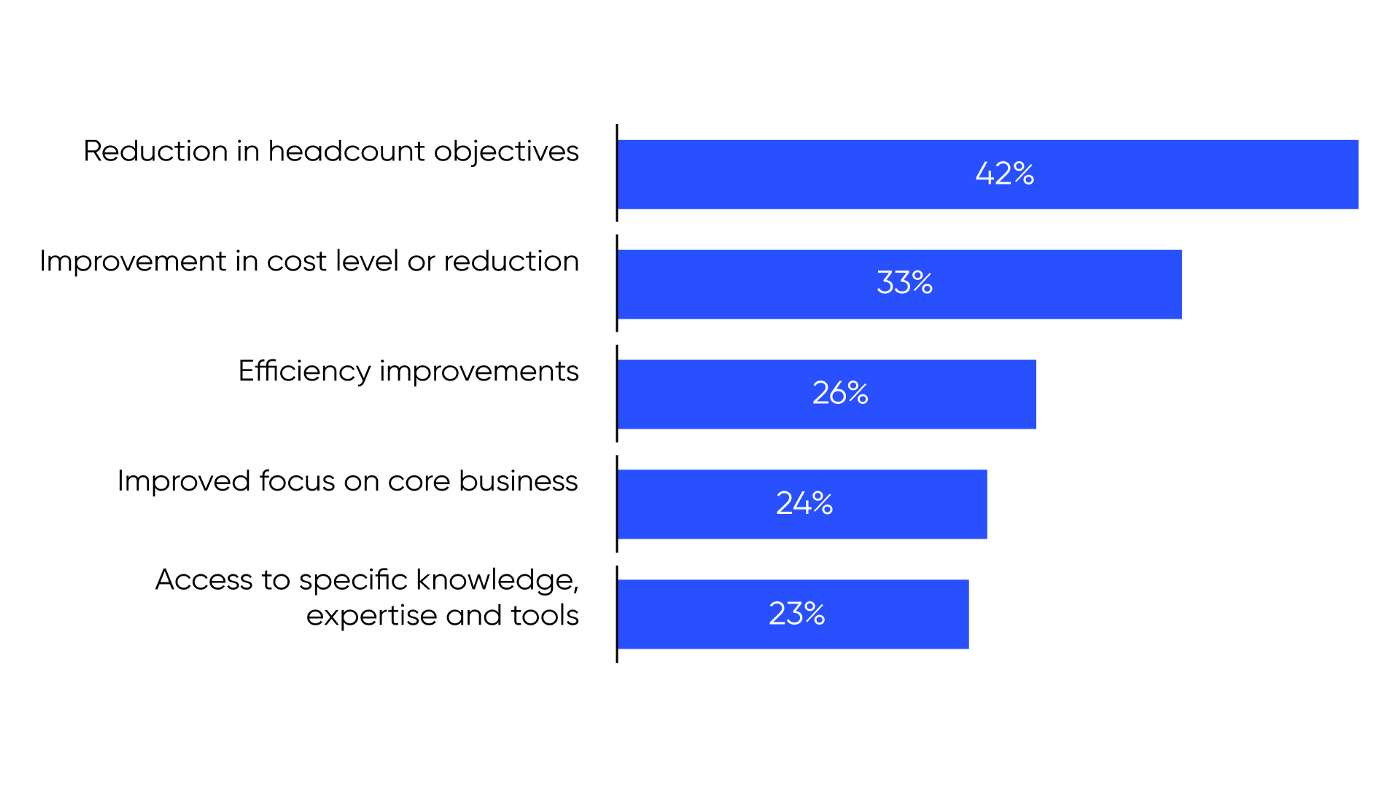 source: EY, Outsourcing in Europe
Here are some final tips to summarize the key points.
Communication
Communicate the project’s goals and objectives clearly and openly.
Always provide precise feedback on the results and expected outcomes.
Keep the communication open both ways, demand regular feedback and updates from your teams.
Maintain regular video meetings to keep the engagement high. Remember the time difference and respect your teams’ time off.
Encourage the team members to communicate individually to keep the relationships open and growing, also on a personal level.
Tools
Use the tools that your teams like or prefer, for example:
- Zoom for meetings
- Slack for project work and collaboration
- Jira for project management and tasks
- Google Drive for intra-team and company-wide file sharing and editing
Avoid using multiple tools for similar tasks or purposes — keep things simple and efficient.
Processes
Make sure your processes are precisely defined and clearly understood by all team members, both onsite and offshore. If necessary, review and tweak them quarterly, to reflect actual work practices. Those include managing performance and motivating teams to achieve their goals.
Finally, when choosing your offshore software development vendor — hire a full stack company.
This will ensure you get a team of experienced professionals with enough track record behind them to offer you a solid advice and feedback on how to tackle even with the most complex challenges and move forward with your project.
If you’d like more insights on how to work with a foreign, offshore software development team — or even how to source one abroad — feel free to contact us. We’ll be happy to help.
Click here to contact Digital Colliers for a free consultation.